KIRA Studio · Glass UI

Made for creators

Elevate your

Make the videos you wish you could.

From your next YouTube upload to a reel with your own signature look. Cut the dead air, add captions, create custom effects and bring your ideas into 3D—all in KIRA Studio.

See what you can make
Glass UIMake your own effectsMade for YouTube, Reels & client work
Meet your next creative workspace
Inside KIRA Studio · your creative workspace
Native Windows applicationEditing · Planar tracking · Roto · Color · SoundDiscover the details ↓

From the first idea to the final export

Your ideas deserve
more than a basic edit.

Create the opening that pulls people in, the look they remember and the details a client notices. Bring your edit, effects, captions and color together without breaking your flow.

01 Smart Timeline

Keep the story moving.

Make the change you had in mind. KIRA’s Smart Timeline closes gaps as you edit and keeps connected titles, graphics, and sound with their shots. Spend more time finding the cut and less time putting everything back together.

  • Automatic ripple closure and connected clips
  • Precision ripple, roll, slip, and slide trims
  • Compound clips, alternate takes, and multicamera editing
Smart Timeline · ripple editing and connected clips

02 Planar tracking & rotoscoping

Make the impossible look like it belongs.

Put a design on a moving surface. Replace a screen in perspective. Separate the subject and carry a color correction through the shot. KIRA brings planar tracking and rotoscoping into the edit, with editable results you can keep refining.

  • Planar tracking with perspective corner pinning and surface replacement
  • Subject masks and editable vector rotoscoping
  • Feathered edges and artist-controlled corrections
  • Tracked masks for local color grading

Track the surface.

Corner-pin graphics and replacement footage to the plane of the shot.

Planar tracking & perspective corner pinning · Live demonstration

Shape the subject.

Refine masks, control the edges, and keep the subject at the center of the work.

Rotoscoping · subject masks and feathered edges

03 Color grading

Give every frame your signature.

Build the look from the first correction to the final grade. Balance a shot, match a reference, shape individual hues, and check the result with four scopes beside your picture.

  • 4 color wheels (Shadows, Midtones, Highlights, Offset)
  • Targeted tonal and hue controls
  • RGB curves, Hue curves, and .cube 3D LUTs
  • Waveform, RGB parade, vectorscope, and histogram
KIRA tonal grading controls with parade, waveform, vectorscope and histogram
Tonal grading controls · four-up Program scopes

04 Silence detection & sound

Keep the good parts. Lose the dead air.

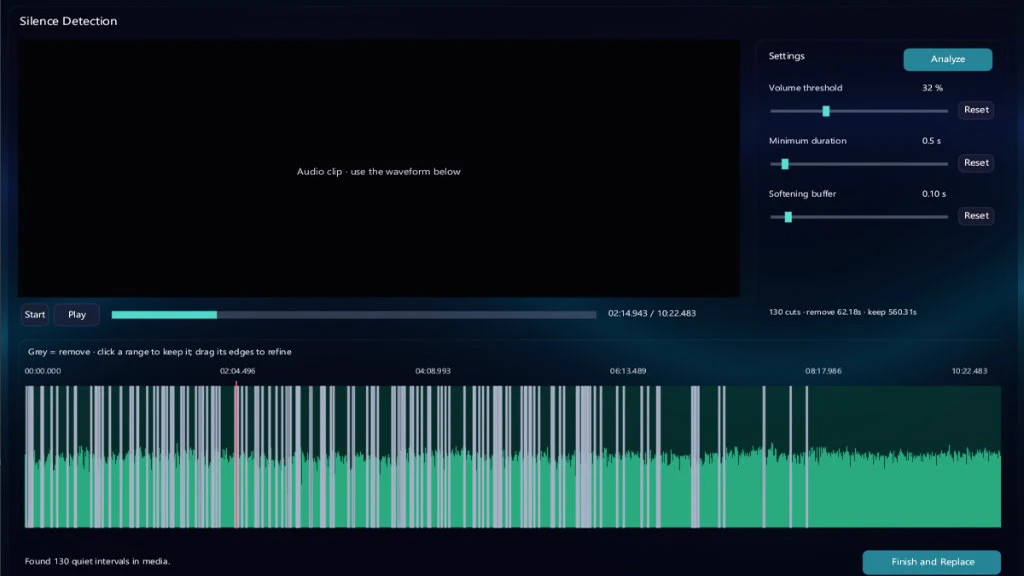
One click starts silence detection. Review the pauses, keep the ones that matter, and apply the cuts. Set the threshold and minimum pause duration, then decide which edits suit the conversation.

  • Silence detection with adjustable thresholds and reviewed cuts
  • Voice isolation and dialogue cleanup tools
  • Beat markers, audio sync, and loudness metering
KIRA Silence Detection with automated dead-air removal and waveform review
Silence detection · automated dead-air removal with waveform review

05 Create with AI

Describe the scene. Then make it yours.

Connect an MCP-compatible AI agent to KIRA and build editable 3D scenes together. Shape the geometry, choose materials, place the lights, animate a camera, and refine the result in the same project as your edit.

  • Build scenes with objects, materials, lights and cameras
  • Animate the scene and adjust the details yourself
  • Refine your idea with frame previews and undo
Try a creative brief“Build a keyboard scene. Place the lights, animate the keycaps, and make the camera move.”

Works with a connected MCP-compatible AI agent. Model access is separate; you stay in control of the editable scene.

MCP-assisted 3D authoring · scene demonstration

Extend the edit

More of the workflow.
In the same project.

Auto subtitles & search

Give every word a place on screen.

Make your videos easier to follow, even with the sound off. Turn dialogue into editable captions, then find the exact line you need in a long recording.

  • Spoken-word and related-topic search
  • Natural-language visual search
  • Local transcription and editable captions

Custom effects

Make the effect you can’t find.

Make the effect your heart desires. KIRA’s built-in creative workspace lets you write custom visual effects, build them inside the editor, see the result, and save it to your own library. Your style doesn’t have to end where a preset does.

  • Build your look with a live preview
  • Custom effects, generators, and transitions
  • Save, reopen, refine, and apply your own assets

Retiming & reframing

Change the pace. Keep the feeling.

Stretch the moment with speed ramps and neural slow motion. Reframe a wide shot for vertical delivery with a tracked crop. One story can take on a different rhythm and a different shape.

  • Curved speed ramps and precision retiming
  • Neural frame interpolation for prepared slow-motion assets
  • Tracked reframing for vertical, square, and portrait formats

Mastering & delivery

From your first cut to their first watch.

Queue the deliverables while keeping the work on your machine. Choose a supported master or distribution format, carry the captions through, and put the finished project in front of its audience.

  • Local render queue and batch delivery
  • H.264, HEVC, AV1, and Intra workflow support
  • Hardware encoding where supported, plus caption delivery

Some AI tools require compatible hardware and installed models. Learn to create your own effects

01 / Native engine performance

Less overhead.
More creative headroom.

Under 300 MB in KIRA’s single-video benchmark. Efficient local playback. Glass UI brings the tools together, with real-world editor references beside the numbers.

KIRA / Engine comparisons
KIRA internal benchmark / Published real-world references

<300MB in KIRA

A compact native footprint. KIRA’s single-video benchmark is approximately 250 MB, staying under 300 MB. See it alongside published app-memory observations from other editors.

Glass UI. Less overhead.
More room to create.

<300 MB Single-video benchmark0 Decoded-frame PCIe copies11.2 ms Video scrub P99.9 gap

Reported app memory · GB · lower is better

KIRASingle-video edit · Windows<300 MB
Internal benchmark
Final Cut ProTravel edit · macOS · 2023<0.70 GB
Published observation
Adobe Premiere ProSimilar travel edit · macOS · 2023≈4 GB
Published observation
DaVinci ResolveTwo 4K edits · MacBook Neo · 2026≈4–5.5 GB
Published observations

Real-world reference points from different workloads, machines and software versions—not a matched four-editor test or a prediction of your project. KIRA’s bar plots ≈250 MB; Final Cut’s bar is a reported upper bound; Resolve’s band spans two observed edits. GPU/shared-memory accounting differs across platforms. No efficiency ratio is inferred.

Sources, workloads & measurement scope +

KIRA. The developer confirms a sub-300 MB single-video result; the reported reading is approximately 250 MB. An earlier multilayer observation was approximately 448 MB. Those are different workloads, not a universal RAM cap. GPU memory and total system RAM are separate.

Competitor memory. Published app-memory observations are rounded for a cross-source reference. The row labels identify the workload and date. This is not one controlled four-editor benchmark; source links remain directly under the chart. Modern versions and other projects can behave differently.

PCIe. The zero-copy figure describes copied video-frame traffic in the supported playback case. It is not a measurement of whole-system PCIe utilization or every operation in KIRA. Competitor traffic remains path dependent and unmeasured in this comparison.

Scrub trace. The historical RTX 3050 Laptop GPU debug run used an H.264 720p CFR intra-frame proxy. P99.9 successful-submission gaps were 11.1684, 13.0153 and 30.6096 ms. These are renderer cadence measurements, not input latency or a 4K playback guarantee.

Open the evidence notes ↗

Native performance

Small by design.

A compact application foundation, with memory spent on the work your project needs.

Glass UI

A clear space for your edit.

An integrated workspace for picture, sound and finishing, with personal backdrops and adjustable glass materials.

Local processing

Your project, on your machine.

Local media, rendering and model inference. Installed models and compatible hardware enable the AI tools.

Zero-copy architecture

Optimized from drive
to display.

A video file is compact. A decoded frame is much bigger. Copying those full frames between system memory and the graphics card takes time and bandwidth. KIRA keeps each frame in GPU memory on its supported playback path.

Traditional NLE path

Example with CPU decoding
  1. CPUDecodes the video
  2. System RAMHolds the full frame
  3. PCIeCopies the frame across
  4. GPU memory (VRAM)Receives the frame
  5. DisplayShows the preview

KIRA zero-copy path

Supported hardware playback
  1. NVMe driveLoads compressed video
  2. GPU memory (VRAM)GPU decodes and reuses the frame
  3. DisplayShows the preview
0 GB/s

Decoded-frame PCIe copies

The GPU can use the decoded frame for your preview where it already sits. Skipping that full-frame transfer leaves bandwidth for other work. Loading the compressed file and other device activity can still use PCIe.

Simplified playback paths. Editors can use different paths depending on footage and hardware. See KIRA’s benchmark notes ↗

02 / Glass UI

One creative workspace.
From idea to final frame.

Glass UI brings the tools around your edit together. Move from your first assembly to the finishing details in a workspace built to keep the picture at the center of your attention.

  1. 01 / Import

    Bring your footage

    Organize supported media and find the shots that belong in your story.

  2. 02 / Edit

    Build the sequence

    Trim precisely, connect clips and shape the pace of your project.

  3. 03 / Finish

    Find your look

    Bring tracking, color, sound and custom visual effects into the edit.

  4. 04 / Deliver

    Share the result

    Choose supported delivery settings and queue the finished work.

Your space, your workflow

Made to feel connected.
Built for your creative work.

Keep editing, tracking, grading and sound in the same project. Personalize your workspace, refine the details and choose the output that suits your audience. Performance depends on your footage, project and hardware.

Import → Edit → Finish → DeliverExplore performance ↑

03 / KIRA MANAGER · PROJECT LAUNCHER

Crafted in glass.
Every project begins here.

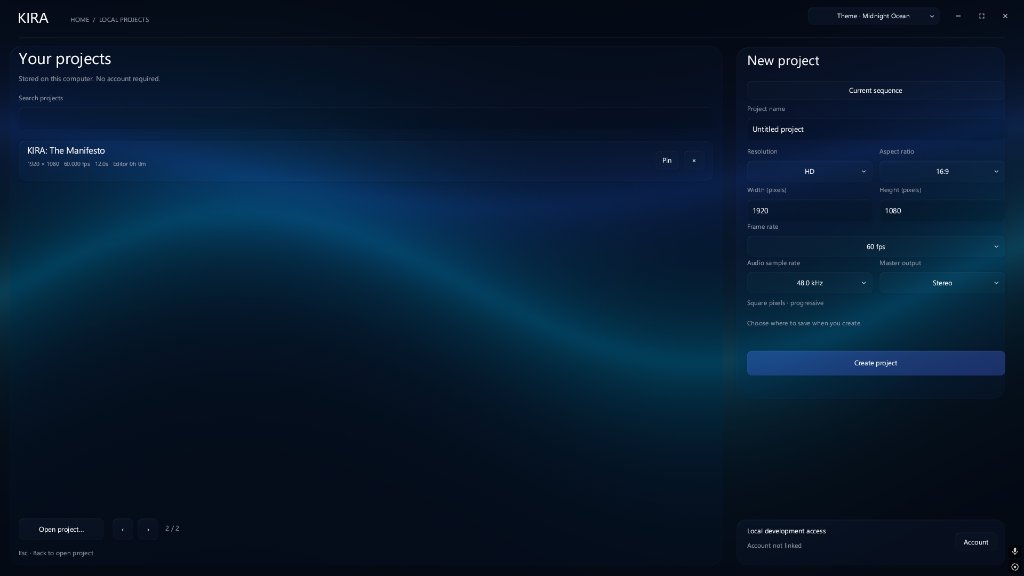
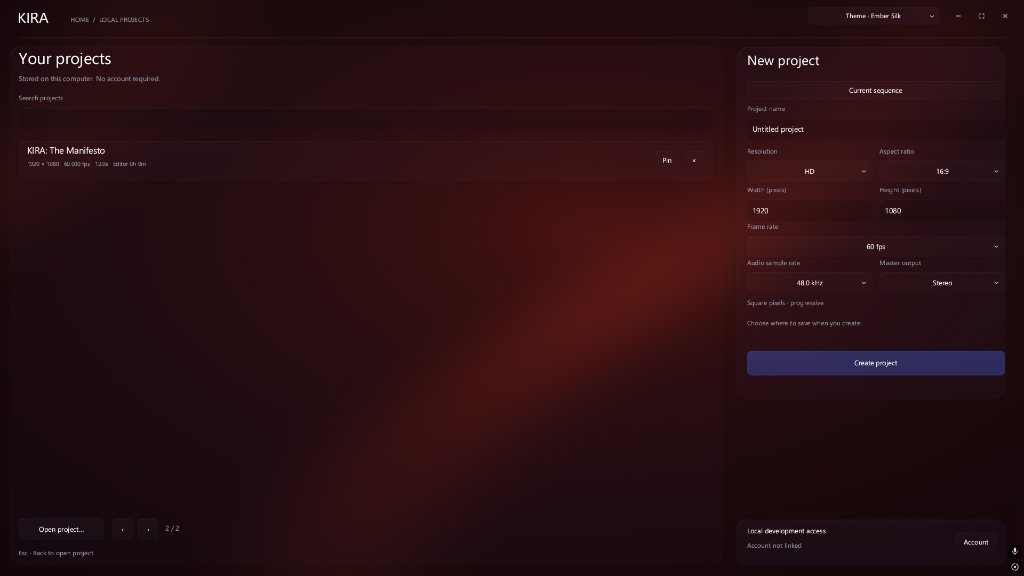
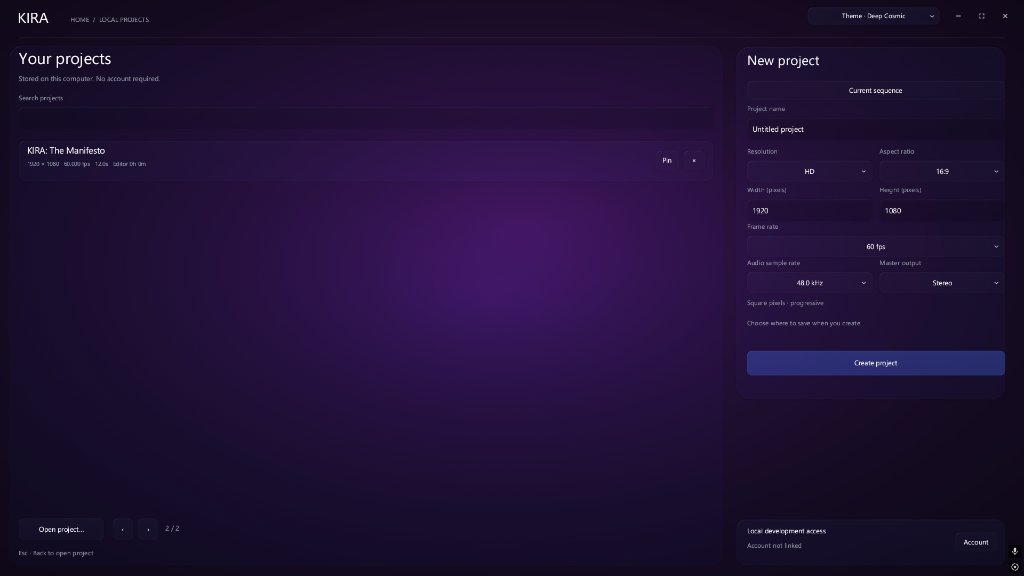
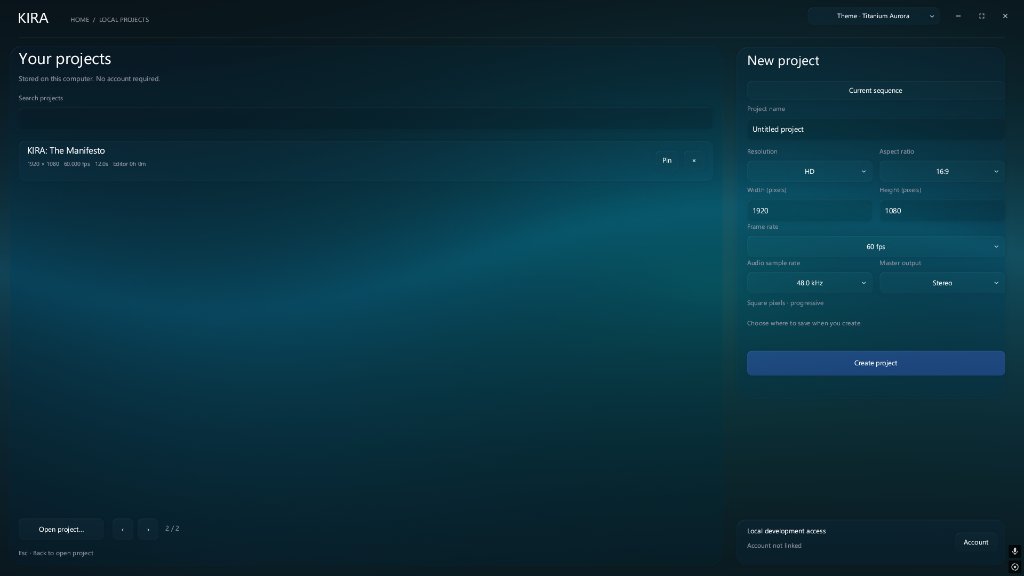
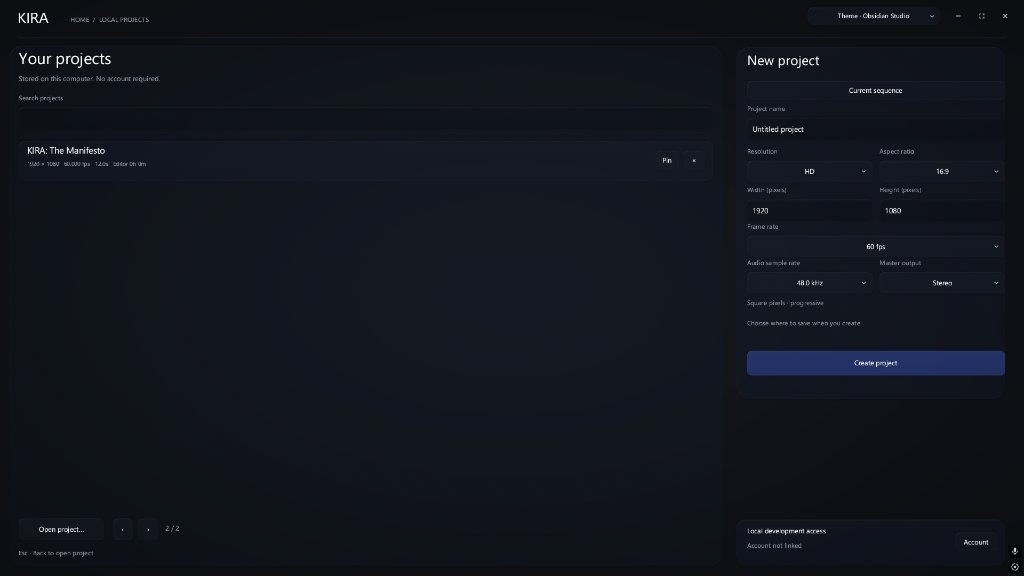
KIRA Manager brings your projects into a native glass workspace. Choose a built-in backdrop or personalize the material with your own image or video. Five of the available presets are shown here; the Program viewer keeps workspace styling separate from the picture.

Workspace Themes 5 presets shown
Animated Wallpapers

GPU-rendered backgrounds add motion to the workspace.

Personalized Photo or Video

Set your own image or looping video as your workspace backdrop with custom glass blur.

KIRA Manager Midnight Ocean Theme KIRA Manager Ember Silk Theme KIRA Manager Deep Cosmic Theme KIRA Manager Titanium Aurora Theme KIRA Manager Obsidian Studio Theme
Midnight Ocean · blue workspace backdrop.

Atomic Super Resolution · ASR

Preview in 4K.
Stay in your flow.

Upscale your editing preview to 4K as you work—without waiting for a separate upscale render. ASR brings clearer edges and finer detail to lightweight previews, with support for integrated and dedicated graphics. Smoothness depends on your footage, effects and hardware.

Softer preview
Enhanced detail

Drag to explore the detail. Arrow keys work too.

Illustrative comparison. Left side subtly softened for presentation; not a measured ASR benchmark.

A new dimension for your edit

Give your edit depth.
Make your move in 3D.

Give your intro depth. Move a camera through your titles. Turn a stack of clips into a scene. Position video, text and graphics in 3D, then animate the camera to bring them together.

3D camera · recorded in KIRA Studio

Layer your shots. Set your camera. Make the move yours.

Explore the interactive 3D demo

Made for the way you create

Different formats.
The same ambition.

Films & stories

Find the performance. Build the feeling.

Explore alternate takes, keep the dialogue in sync, and carry the same project from the first assembly to the final grade.

Smart Timeline · Multicam · Color grading

Explore the tools

Windows · planned launch pricing

Start creating.
Support KIRA as you grow.

Start with the free editor. Choose a paid plan when you’re ready to publish without a watermark.

Free

₹0

For learning and making your first edits.

  • Cut, layer, and finish your videos
  • Save and reopen your projects
  • Video exports include a KIRA watermark

Founding 100

First 100 paid members
₹99/ month

A founder rate locked while you stay subscribed.

  • Studio with clean exports
  • Monthly membership
  • Support independent development

Studio

₹399/ month

Standard monthly rate · India

  • Publish without a watermark
  • Create your own effects and templates
  • Make titles and camera moves in 3D

Try 14 days of clean exports

The planned trial lets you finish a real project in Studio. When it ends, you can continue on Free or choose a paid plan.

How the founder rate works

Spots are counted when the first payment succeeds. Your rate stays locked at ₹99 in India or US$1 internationally while your subscription remains active, including its payment retry window. After your paid access ends, you return to Free and can choose Studio at the current rate.

“I spent two years building KIRA Studio from scratch in Rust on a midrange laptop. If it earns a place in your workflow, your support helps me fix bugs, test more setups, and keep building it.”

The creator of KIRA Studio

A few things to know

Before your
first cut.

What is KIRA?

KIRA Studio is a native Windows video editor that brings editing, tracking, color grading, sound, captions, and delivery into one workspace. It is built for creators working on films, YouTube videos, podcasts, social content, and client projects.

Where can I download KIRA Studio?

Choose Get KIRA Studio to check Windows installer availability. Pricing shows the planned Free, Founding 100 and Studio options.

Does KIRA process my footage locally?

KIRA is designed around local project files, media, rendering, and AI processing. Some AI features need compatible hardware and separately installed models. Internet access and activation requirements for the subscription will be confirmed before launch.

How should I read the performance charts?

The memory comparison pairs KIRA’s sub-300 MB single-video benchmark with linked, published observations for Final Cut Pro, Premiere Pro and DaVinci Resolve. Workloads and platforms differ. Zero-copy shows decoded-frame PCIe staging on the stated architecture, not total bus usage. The scrub tab shows KIRA’s own recorded renderer timings. Each view includes its scope and sources.

What makes Smart Timeline useful?

Automatic ripple closure helps keep the sequence together when a shot changes. Connected titles, graphics, and sound follow their shots, while precision trims and compound clips give you more control over the edit.

Which platforms and formats does it support?

KIRA is being developed for 64-bit Windows. Its media pipeline includes H.264, HEVC, AV1, Intra, and DNxHR support, with hardware acceleration depending on the codec and GPU. Tested system requirements and the final format matrix will accompany the release.

What do the product demonstrations show?

This page includes KIRA workspace, timeline, tracking, rotoscoping and 3D scene recordings, plus color and silence-detection images. They illustrate development builds; appearance and availability can change before release.

Make something worth watching

You have the vision.
Give it KIRA.

Explore the plans

KIRA Studio for Windows

Get KIRA Studio.

The Windows installer is being prepared. Check Pricing for planned launch options.